
Import history for your team can be found by navigating to Settings > Data and Integrations > Contact Imports
Note: Import history will only display on this page for manual data imports. For schools using Radius or Connect, import history is shown under the configuration area in Mongoose.
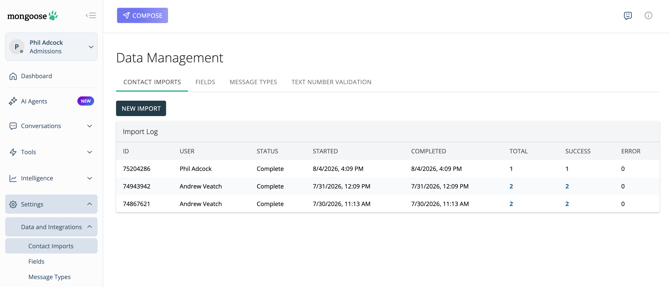
The 50 most-recent imports (or last 15 days) will be displayed, showing who initiated the import, the status, the date started/completed, and the results.
The numbers in the "Total," "Success," and "Error" columns are clickable hyperlinks
- Total: Clicking this will download a copy of the import file as it was imported into Mongoose
- Success: Clicking this will download a file that shows the contacts that were successfully imported
- Error: Clicking this will download a file that shows the contacts that were not imported. It will also give a reason for the contact erroring. If you need help understanding the reason for why a contact errored upon import, please reach out to support at support@hellomongoose.com
Note: Any errors must be corrected in order to have the contact record imported/updated.