
Initial Setup
Navigate to "Team Name" > Advise Integration.
If you have never configured the Advise integration before, the following screen will be presented:

Click [ Configure] to begin the initial setup.
Advise Connection Settings
Click on Advise Settings to configure authentication. Authentication requires an account in the Ellucian ADADMIN domain that has access to both your test and production instances.
NOTE: The ADADMIN domain is only supported with service accounts or api accounts. If you do not have a service account (ADADMIN\svc_) or API account (ADADMIN\api_) you will need to request a new service account from Ellucian. Ellucian will then provide credentials.
Fill in your Username, Password, ADFS Root URL will be prefilled, and your CRM Root URL from Advise.
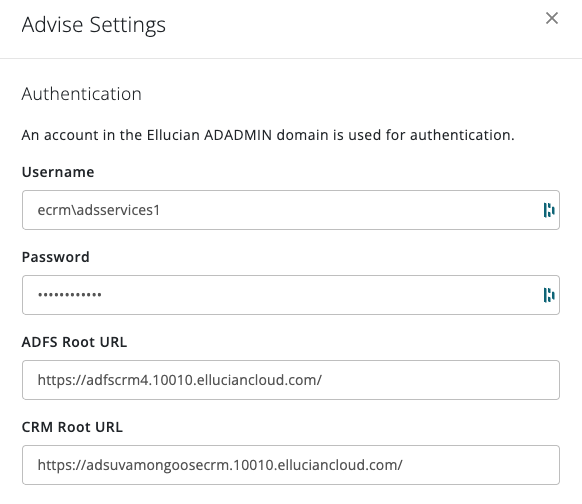
By default, Mongoose will pre-fill the ADFS Root URL to be for a production environment. Please make sure the correct environment ADFS URL is in the Authentication settings.
- Test Environment ADFS Root URL: https://adfs4testus01.elluciancloud.com/
- Production Environment ADFS Root URL: https://adfs4produs01.elluciancloud.com/
Once testing is completed, make sure to change the Root URL back to the production URL https://adfs4produs01.elluciancloud.com/
Note: If you encounter authorization errors, make sure there isn't anything additional past the trailing slash after the host
Notification Emails
To receive email notifications around integration failures (connection to Advise, password expiration etc..) or daily import notifications, please enter an email address (or multiple) for those who should receive those notifications.
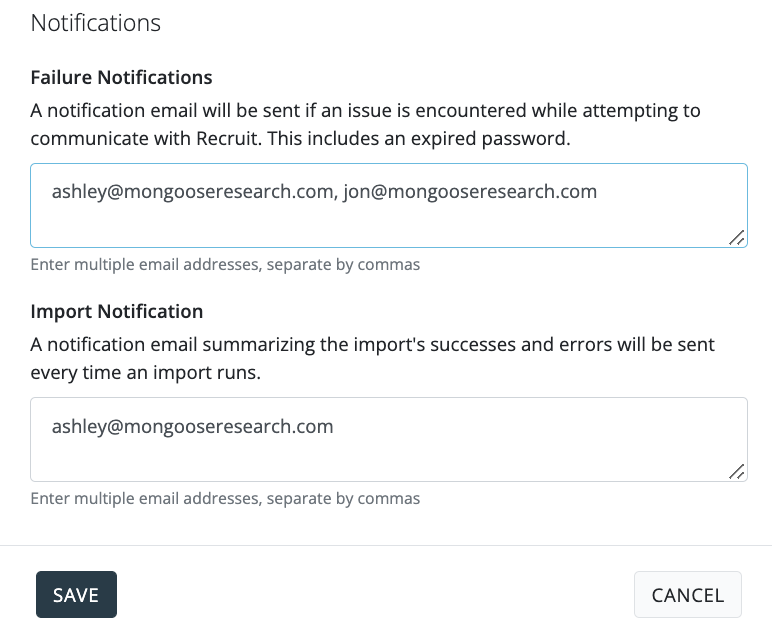
Click [ Save]