
Setting up a new Activity Code in Advise
In order to have Mongoose text messages show up in Advise, our integration utilizes the custom message activity entity that Ellucian ships with Advise. This data will appear in Advise in the existing Activities feed for the contact and related contact.
In order to receive message activity in Advise, you will need to create an Activity Code to associate to the texting activities we will create through the integration.
Please keep the Activity Code handy, as you will need it to configure message activity in the corresponding next steps.
An example:
Configuring Exports
Exports is where you'll configure text message exports to Advise using the Activity Code you created in the steps above. You can also choose to export opt out changes.
Click on Exports and then Export Settings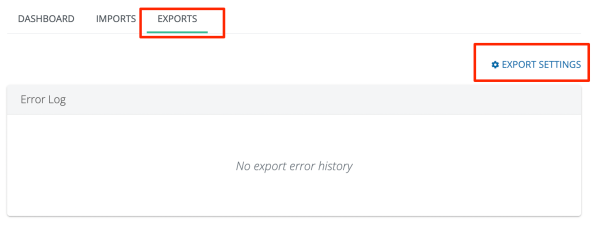
Within Export Settings:
- Select the checkboxes to enable message activity exports and opt-out status change exports
- If Opt-Out status changes is selected, Mongoose will update Advise with any changes in opt out status that occur in real-time.
- Include the Activity Code you set up in Advise in the previous step
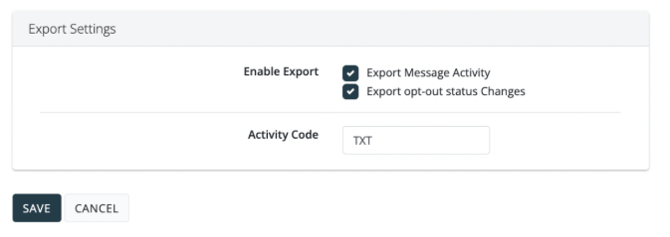
- Once complete, click [Save]
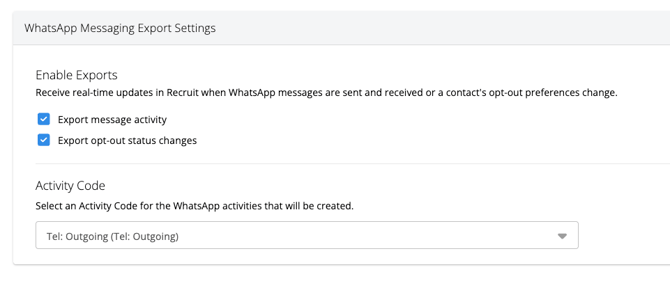
If your team has WhatsApp enabled, you will also be able to configure WhatsApp exports. The same information above applies when setting this up:
- Select the checkboxes to enable message activity exports and opt-out status change exports
- If Opt-Out status changes is selected, Mongoose will update Advise with any changes in opt out status that occur in real-time.
- Include the Activity Code you set up in Advise in the previous step
- Once complete, click [Save]
Export Error Logs
The Exports tab provides a designated Error Log tracking area should Mongoose encounter any issues when exporting message activity back to Advise.
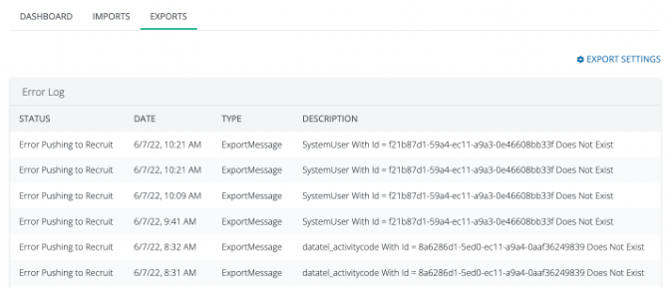
Please reach out to support@hellomongoose.com if you have any questions troubleshooting the export errors.
Troubleshooting
Message activity isn't going back to Advise
1. Make sure that each Mongoose User's UserID is set to the Advise User GUID. (Example GUID: 7C86C8DB-DCB9-EC11-A974-E7AA11D4AA25)
2. Make sure that the Activity Code is correct within the Advise Export Settings