
Overview
Mongoose supports a bi-directional automated integration with Ellucian's cloud-hosted Advise 5.x+ instances by leveraging the underlying Microsoft Dynamics Web APIs and does not utilize any Ethos infrastructure.
The Advise integration allows for:
- Importing data from Advise: Contact data is made accessible in Advise on a Saved View. This view is queried by Mongoose and contact records are created.
- Exporting message data to Advise: As text messages are sent/received by Mongoose, corresponding Activities are created in Advise in real-time.
- Exporting opt-out changes to Advise: As contacts’ opt-out preferences change, those updates can be pushed to Advise in real-time.
There is only a very minimal amount of setup needed in Advise, and no custom development is required. The following information will be explained further in the corresponding documentation.
- Authentication requires an account in the Ellucian ADADMIN domain.
- NOTE: The ADADMIN domain is only supported with service accounts or api accounts. If you do not have a service account (ADADMIN\svc_) or API account (ADADMIN\api_) you will need to request a new service account from Ellucian. Ellucian will then provide credentials.
- Imports of contact data require the creation of a Saved View based on Opportunities. This view can bring in additional fields from Contacts and other objects in Advise.
- Message data is created in the custom message Activity entity that Ellucian ships with Advise, and this data will appear in Advise in the existing Activities feed for the contact.
- All the data transfer mentioned above is initiated and carried out within Mongoose automatically - there are no required manual steps post-configuration, and no additional programming tasks within Advise.
There are 4 automatic import times available per day and you can use any many or as few as you'd like; the available options are overnight (very early AM), morning, afternoon, and evening.
Note: This integration is only available for Mongoose Text. Mongoose Chat does not currently support this integration option.
Enabling and Locating the Integration Settings
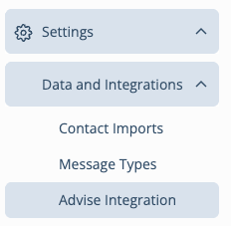
If you are interested in enabling the Advise integration in your team, please reach out to your Client Success Lead at Mongoose or contact our support team (support@hellomongoose.com). The integration can only be enabled by Mongoose. Once enabled, it will appear under the admin tools for your team by going to Settings > Data and Integrations.
Documentation
Documentation on specific sections of this integration can be accessed from the options below.