
Open AI Analytics
- Open AI Agents from the main navigation.
- Select the Analytics tab.
- Choose the reporting period you want to review.
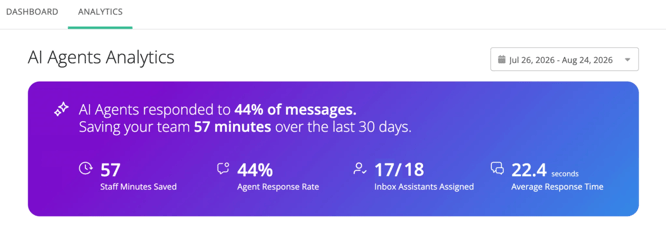
Understand the summary
The summary provides a high-level view of Inbox Assistant adoption and impact for the selected period. Depending on the released dashboard, it may include:
- Staff minutes saved - An estimate of the staff time saved through assistant responses and automatic archiving.
- Agent Response Rate - The percentage of conversations that the AI Agent responds to without a staff member.
- Inbox Assistant assignments - The number of eligible inboxes where Inbox Assistant has been assigned.
- Average response time - How quickly Inbox Assistant analyzes and responds to incoming messages.
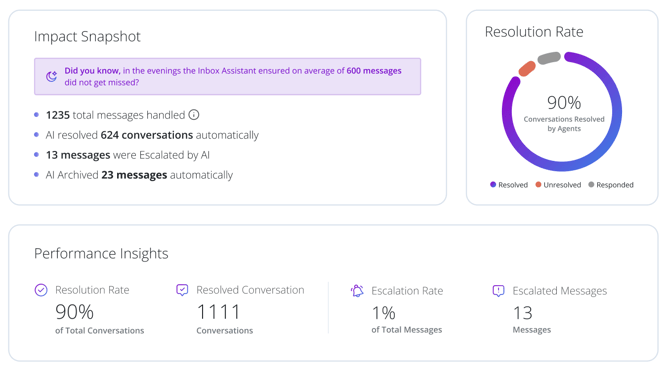
- Messages handled. Incoming messages where Inbox Assistant responded, archived the conversation, or escalated it for staff attention.
- Resolved conversations. Conversations where Inbox Assistant responded and the conversation was marked resolved.
- Conversations archived - Conversations archived by Inbox Assistant without staff action.
- Messages escalated - Messages routed to staff for human attention.
- Response rate - The percentage of incoming messages that received an Inbox Assistant response.
- Resolution rate - The percentage of assistant-touched conversations that were successfully resolved.
- Escalation rate - The share of Inbox Assistant responses that resulted in an escalation.
Review trends and inbox comparisons
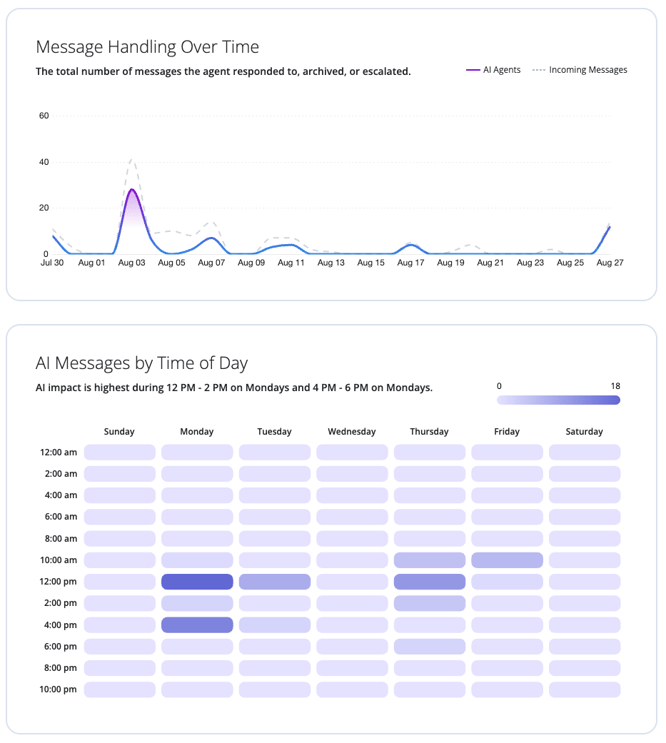
Use the trend and comparison sections to understand when Inbox Assistant is most active and how results vary across inboxes.
- Compare assistant responses with incoming message volume over time.
- Review activity by day of week and time of day to understand coverage gaps.
- Compare messages, escalations, resolution rate, and estimated hours saved by inbox.
How staff time saved is estimated
Staff hours saved is an estimate based on the average time required for staff to read, respond to, and archive conversations. The estimate does not include time spent analyzing questions, retrieving information, or deciding how to respond, so it is intended to provide a conservative view of time savings.
If the dashboard is empty- Expand the reporting period.
- Confirm that Inbox Assistant is assigned and active in at least one inbox you can access.
- Allow time for recent activity to appear in reporting.