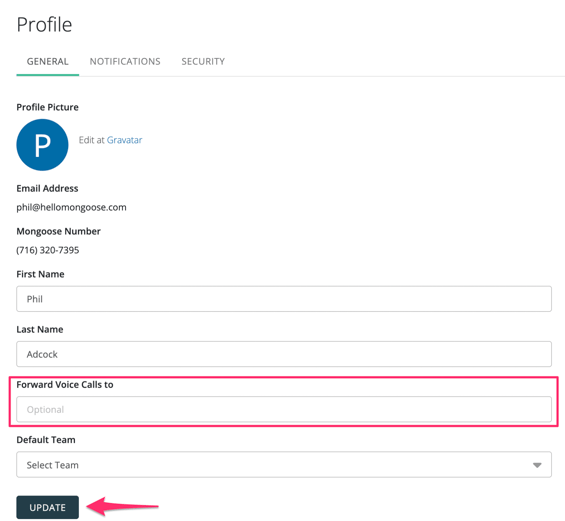
If you are utilizing a virtual number (i.e., not a text-enabled landline number) and someone calls that number instead of sending a text, the next step depends on whether or not you have voice forwarding enabled.
If you have voice forwarding enabled, the voice call will be routed to the forwarding number and processed as a normal phone call (i.e., it will ring that phone). If you do not have voice forwarding enabled, the caller will immediately receive an automated message stating that the number is not a working voice number.
Setting Up Voice Call Forwarding
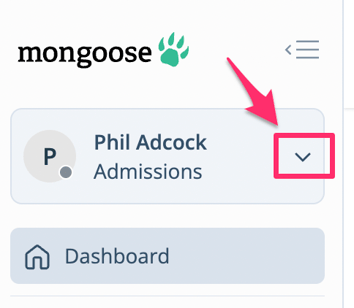
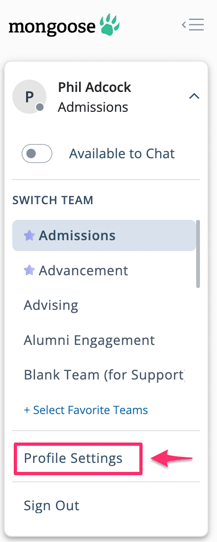
To set up call forwarding, click the dropdown arrow at the top left where your name is, then click on Profile Settings. From there, you will see the option to add a number to forward calls to. You can set this up and test it.
Please note that you may have to test this 2-3 times (calling your Mongoose number) before it syncs and works properly.
Visual Step-By-Step Guide
Step 1: Click the dropdown arrow next to your name
Step 2: Click on Profile Settings
Step 3: Add your number under "Forward Voice Calls to", then click UPDATE